Local music, without an account
Play your own MP3, FLAC and WAV files offline. Local listening does not require an account. Your available device storage determines how much audio you can keep locally.
Your music. Wherever you go.
Keep local songs ready for travel, work or bedtime. Use separate queues, an equalizer and a sleep timer. Cloud and community features require an internet connection.
Real app recordings with a demo music library. Explore the controls, then follow the guide to try them with your own files.
Play your own MP3, FLAC and WAV files offline. Local listening does not require an account. Your available device storage determines how much audio you can keep locally.
Adjust the sound in the equalizer or start with a preset. Tune playback for the music and headphones you are using, without editing the audio file itself.
Create and name separate queues for work, workouts or the journey home. Switch the active queue instead of replacing the same upcoming list every time.
Stop playback after a chosen duration, at the end of the current track or at the end of the queue. Useful for an evening playlist or a long recording before bed.
Save your place in albums and long recordings so you can return later. Combine bookmarks with separate queues to keep music and spoken audio organized.
Browse and control your music through Android Auto on a compatible vehicle or head unit. Prepare local tracks before the trip; remote content needs a reachable source and an internet connection.
Step-by-step setup
Start with a preset, then adjust the sound for your headphones, speakers or spoken-word recordings.
Before you start: Play a locally available track in MyMusik and use a comfortable listening volume.
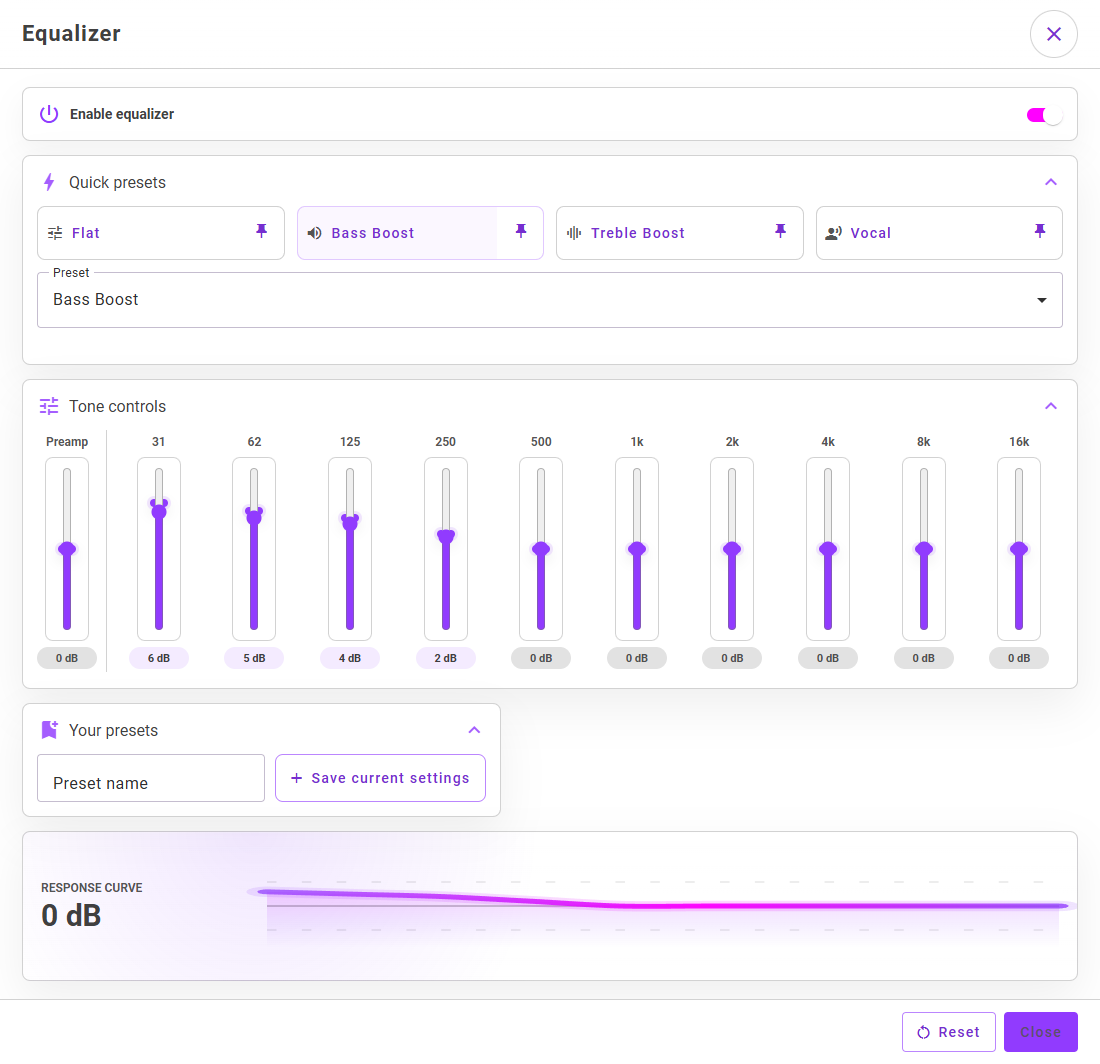
Open Equalizer from the player controls or playback settings. Turn on Enable equalizer at the top of the dialog.
Try Flat for a neutral starting point, Bass Boost for more low end, Treble Boost for more high end, or Vocal for voice-focused listening. More presets are available in the Preset list.
Use the controls from 31 Hz to 16 kHz to change individual frequency ranges. Make small adjustments and listen to the same passage as you compare.
Preamp changes the overall level entering the equalizer. If boosting bands makes playback sound distorted, reduce the preamp or reduce the boosts.
Enter a Preset name under Your presets and choose Save current settings. You can recall it from the preset controls and pin the selected preset to a quick slot.
Toggle the equalizer off and on to compare. Settings save automatically; there is no separate Apply button. Use Reset to return to the default sound when you want to start again.
Your selected sound settings are applied during playback, and a saved custom preset is available for later listening.
If you hear no difference, make sure Enable equalizer is on and try a clearly different preset while the same track is playing. Recheck the settings after switching the audio output device. If the sound becomes harsh or distorted, reduce gains and preamp.
Yes, when the audio files are stored locally. Cloud import, sync, AI and community features need a connection, and some require an account. MyMusik does not include a subscription music catalog.
Yes. The Android app includes Android Auto integration for browsing and playback on compatible vehicle displays. Keep the music you need locally available before a trip without reliable mobile internet.
Yes. Create named playback queues and switch between them, so a work session, an audiobook and a driving playlist do not have to share one upcoming list.
Choose a duration, the end of the current track or the end of the queue. Turn the timer off when you want continuous playback again.
Only after the audio has been imported or downloaded to the device. Check local availability and test without internet before you travel. You can choose a smaller selection instead of storing the whole collection.
Start from the download and setup page , import one real folder, and verify playback in offline mode.
Use pricing and plan comparison to match storage and token limits to your collection size.
Open getting started docs for onboarding and API docs for scripted workflows.