Own Your Music. Do Not Rent It.

Your music. Your library. Everywhere.

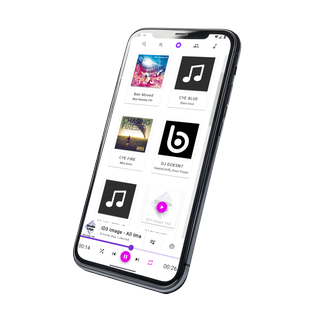
MyMusik is a modern music player that brings streaming-level convenience to your personal music collection across all your devices. Keep full control of your music, metadata, tags, library, and privacy. Import folders in minutes, organize audio files and metadata in one place, sync only what you actually listen to, and keep the tracks streaming services do not offer. Use AI commands to queue songs, create tags, and handle routine library tasks in seconds. Discover and discuss music with people who love the same songs.

Free plan available. Paid plans from EUR 17.99/year.

Streaming-level convenience for owned libraries, often cheaper long-term, with your files staying yours.

Music Library Organizer Offline Music Player Cross-Platform Sync AI Music Assistant Music API Platform
  • Edit audio in one workflow: trim, cut, and extract audio without leaving your music library
  • Organize every detail: manage albums, artists, tags, lyrics, release year, cover art, and more
  • Control music with natural language: ask AI to find songs, queue music, and control playback
  • Sync across devices: add music on Android, listen on Windows, and keep only the songs you want on each device
See MyMusik vs streaming apps

Runs on:

  • Windows
  • Linux
  • Android
  • Browser
  • iOS (planned)

Screenshots

See MyMusik in action

Explore key screens for playback, search, metadata editing, AI controls, and sync workflows.

Collector Workflow

Turn scattered audio files into an organized library in three steps

01

Fast audio file import for MP3, WAV, FLAC, and more

Import MP3, WAV, FLAC, and other audio files or full music folders in minutes. Your tracks are added to one library automatically, so your music stays organized, easy to browse, and ready for fast playback.

02

Organize your library your way

Cut songs, edit tags, artwork, playlists, and file details in one place. Search your whole library instantly, clean it up the way you want, or use the AI music assistant to queue tracks for you.

03

Sync across devices, download only what you want

Add music on any device and sync it to your other devices. Keep your full library in the cloud as an online backup, then download only the music you want on each device for online or offline listening.

Why users switch to MyMusik

Built for owned libraries, from community-powered discovery to AI-assisted control

Community

Track Comments and Community Discussions

Comment on tracks, discuss songs with other listeners, and share ideas with a community built around owned libraries.

Library Editing + Metadata

Edit Audio, Cover Art, and Metadata in One Workflow

Cut tracks, extract sections from audio files, rename songs, update cover images, and manage lyrics, tags, year, artists, and album details without bouncing between separate tools.

AI Copilot

AI

Ask AI for Playback, Playlist, Sync, and Library Actions

Use natural-language commands to play songs, queue tracks, create tags, or create playlists. Customize prompts, your preferred ai models, and training tailored to your library workflows.

Insights + Resume

Listening Metrics and Album Resume Bookmarks

Track listening history, monitor library activity, and continue albums from where you stopped.

Selective Sync

Sync Your Library Across Devices, Online or Offline

Sync your library across your devices with selective control, keep backups online, and take music offline so the right parts of your collection are always with you.

Music Server + API

Host Your Music Library and Control It with the API

MyMusik turns your device into a local music server, letting you access and share your owned library across your network while automating playback, metadata, imports, playlists, sync, and other music library workflows through the HTTP API.

Simple Pricing

Choose the plan that fits your library size and usage style

Every plan includes offline playback, selective sync workflows, AI assistant usage, and encrypted backup controls for private collections.

Free

Free

  • ~150 MP3 songs*
  • 500 MB cloud storage soft cap
  • 1,000 AI tokens once
  • Ads may appear on Free.
  • Offline playback

Basic

EUR 17.99 / year

  • ~7,500 MP3 songs*
  • 25 GB cloud storage soft cap
  • 75,000 AI tokens / month
  • Estimated voice-command song requests / month: 30-75
  • Offline playback

Advanced

EUR 29.99 / year

  • ~30,000 MP3 songs*
  • 100 GB cloud storage soft cap
  • 200,000 AI tokens / month
  • Estimated voice-command song requests / month: 80-200
  • Offline playback

Pro

EUR 49.99 / year

  • ~90,000 MP3 songs*
  • 300 GB cloud storage soft cap
  • 600,000 AI tokens / month
  • Estimated voice-command song requests / month: 240-600
  • Offline playback

Cloud cap only. Offline library size is not plan-capped (device storage applies). *Song estimate is rounded for marketing and based on average 4 MB originals with compression factor ~0.86 (effective ~3.45 MB per song).

Music Server + API

Use MyMusik as local music infrastructure for playback, sync, and automation

Run MyMusik on one device and control your library locally, across your own network, or from other devices through the HTTP API. Automate playback, metadata, imports, playlists, sync, dashboards, and custom player workflows while keeping critical flows offline-capable.

Control the full app from one local API surface

Whether you automate on the same device or connect from dashboards, scripts, custom user interfaces, and other tools on your network, the MyMusik API gives you one interface for playback control, library management, selective sync, imports, and self-hosted music workflows.

  • Control playback, queue state, playlists, ratings, tags, lyrics, and metadata updates through one API.
  • Trigger imports, cover art updates, selective sync, backups, and device jobs from scripts and automation tools.
  • Connect AI command flows to deterministic API actions for auditable local playback and library operations.
  • Build dashboards, storage views, backup monitoring, custom music player interfaces, and cross-device library status tools on your own network.
Illustration of MyMusik local music server, API automation, and custom music player interfaces

MyMusik vs Streaming Services

Discover with streaming. Own with MyMusik.

Streaming gives licensed catalog access. MyMusik gives ownership of your file copies, deeper control, offline continuity, and one personal library across your devices.

Ownership of files is not transfer of copyright.

What mattersStreaming servicesMyMusik
Core modelYou rent access to a licensed catalog. It is convenient, but the service controls the catalog, the rules, and your continued access.You build a personal music library from files you own and keep.
Audio quality and playback stabilitySome services now offer higher-quality tiers, including lossless, but playback still depends on the service, account status, device support, and playback path. Apple notes device and connection limits, and Bluetooth is not lossless.Highest quality ceiling and most consistent playback for your own library. Your original files stay intact, and offline playback has no network buffering, no streaming lag, and no catalog substitution.
Offline listeningOffline music is tied to provider rules. Spotify and YouTube Music require paid memberships for music downloads and periodic online check-ins, and Apple Music downloads from the catalog stop working when the subscription ends.Offline is normal playback. Desktop and mobile apps can play your library online or offline with no music subscription required.
Cost logicYou keep paying for access to the catalog. Streaming providers are also dealing with clear price sensitivity and subscription fatigue.No mandatory music subscription. Pay only for the app and optional backup or sync infrastructure. If you do not need sync, you do not need a subscription.
Long-term continuityCatalog access can change by permissions, country, or catalog removals. Spotify says availability varies over time and between countries, and Apple documents that songs can become unavailable or be removed from the Apple Music catalog.Your archive stays usable as long as you keep the files. Your music is not dependent on changing licensing deals.
Missing or rare tracksIf a release is not licensed, not available in your region, or removed from the catalog, you cannot rely on the service to keep it accessible.Import rare, unreleased, regional, personal, or missing tracks and keep them in your own archive permanently.
Library editing and customizationStrong for casual playback, but limited for deep file ownership workflows. Playlist UX matters a lot to users, yet even streaming research highlights usability gaps and demand for more control.Maximum customization. Edit tags, covers, filenames, playlists, folders, metadata, and library structure exactly the way you want.
Cross-device useGood for service-managed cloud access inside one ecosystem.Sync your own library state across devices, with selective sync. Your offline-capable API can also control devices directly, including starting playback on one device from another device.
Privacy and controlListening depends on provider accounts, cloud infrastructure, and platform rules.Local-first ownership model. Your listening habits, private files, and custom archive stay under your control, with encrypted backup options when you want them.
Lock-in riskHabits, playlists, and saved content are tied to one platform and its terms.A file-first library reduces platform dependency over time. Your archive remains yours even if you stop syncing.
Best fitBest for renting broad catalog access and instant discovery.Best for ownership, offline reliability, private libraries, deep customization, and long-term continuity.
Your Library, Your Rules

Ready to stop renting access to your own music?

Import once, sync what matters per device, and keep your collection accessible online or offline. Add AI help when you want speed, keep manual control when you want precision.